
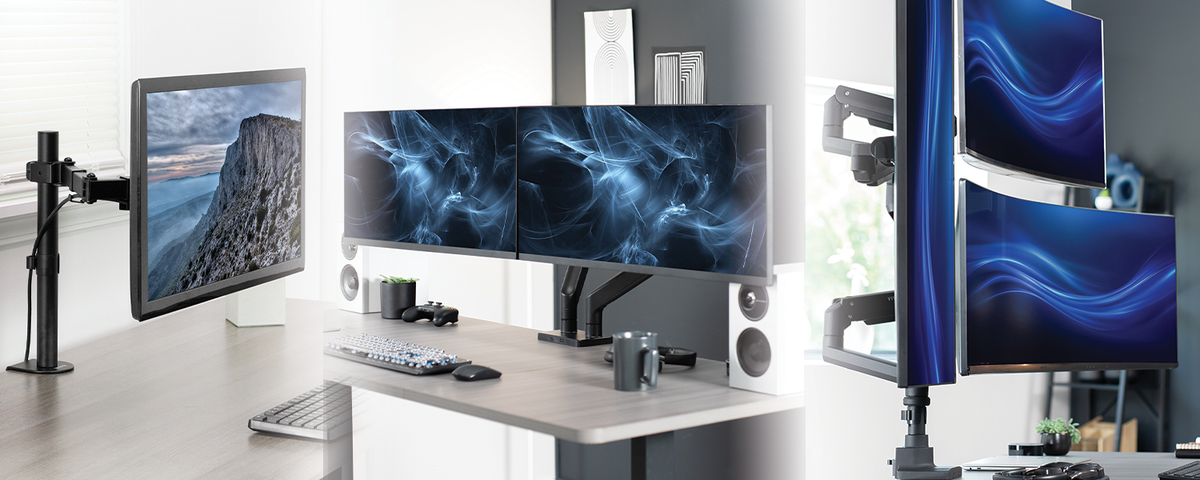
You look at your monitor more than almost anything else in your day. So when the stand is wobbly, the height is wrong, or your desk is buried under a bulky base, it shows up fast, in your neck, your posture, and honestly, your patience. The good news is that fixing it isn't complicated once you know what to actually look for. Choosing between a monitor mount and a monitor stand comes down to three things: your desk, your setup, and how you work. Let's explore each one.
Start With Your Desk, Not the Monitor
Before you even think about arms, swivels, or VESA plates, look at your desk. Is the edge thick or thin? Is there a lip for a clamp to grip, or is it a solid slab that needs a grommet mount instead? Do you share the desk with a keyboard tray, a docking station, or a standing desk converter that's already eating up space?
This matters because most mounting failures aren't about the mount itself; they're about a mismatch with the desk. A clamp mount on a desk with rounded edges won't sit right. A grommet mount needs a drilled hole, which isn't always an option on rentals or shared furniture. VIVO's clamp-and-grommet combo mounts solve this by giving you both options in one product, so the desk decides the install method instead of the other way around.
How Many Monitors Are You Using?
A single monitor setup and a triple monitor setup are two completely different mounting scenarios. One monitor just needs stability and the right height. Three monitors need a mount that can handle combined weight, keep each screen level, and not tip the whole rig forward when you adjust one side.
Check the VESA pattern and weight rating on your monitors first, then match that to the mount. If you're running two or more screens, look for options built specifically for multi-monitor setups rather than trying to stack single mounts side by side. VIVO's dual and triple monitor desk mounts are built with independent articulating arms, so you can angle one screen for video calls and another for reference material without disturbing the rest of the setup.
Wall Mount, Pole Mount, or Desk Mount?
This is where most of the decision-making actually happens. A desk clamp mount is the most common choice because it's flexible, fits nearly any desk, and can be repositioned without much effort. A wall mount frees up the entire desk surface, which is worth considering if you're working with a small space or want a completely clean, minimal look. A pole mount sits between the two, giving you a sturdy vertical base that can also hold accessories like a desk lamp, webcam, or mic arm alongside the monitor.
If your desk space is tight or you're setting up in a shared room, a wall-mounted monitor arm keeps the surface below completely clear. If you like the idea of consolidating your whole setup onto one stand, a pole mount system is worth a look, especially for gaming or streaming setups where cable management and accessory mounting matter just as much as the screen itself.
Fixed, Tilting, or Full Motion Adjustable?
Not all mounts move the same way, and this is the part people underestimate. A fixed mount holds the monitor at a set height and angle, which works fine if your desk setup doesn't change much day to day. A tilting mount lets you angle the screen up or down, useful if you're switching between sitting and standing. A full-motion, gas spring mount lets you extend, retract, tilt, swivel, and rotate the screen with almost no effort.
If neck strain or glare has been an ongoing issue, this is usually the fix. Getting your monitor to actual eye level, rather than wherever it happened to land out of the box, makes a bigger difference than most people expect. VIVO's pneumatic monitor arms are built for exactly this, with tool-free height adjustment so you can reposition the screen throughout the day without wrestling with knobs.
When a Monitor Stand Makes More Sense Than a Mount
Not every setup needs an arm. If you're not dealing with neck strain, don't need to reposition your screen often, or you're working with a desk that can't support a clamp or grommet install, a monitor stand riser is the simpler answer. It raises your screen to a better viewing height without any hardware installation, and many options include built-in storage, so you're gaining desk space instead of losing it.
This is also the better route for renters, shared workspaces, or anyone who wants a quick upgrade without committing to a permanent mount. VIVO's monitor stand riser is a good example of solving the height problem while adding a spot for a keyboard, notebook, or accessories underneath.
Matching the Mount to How You Actually Work
At the end of the day, the right choice depends less on what looks impressive and more on how you use your desk. Gamers often want quick, tool-free repositioning and pole mounts that can hold accessories. Anyone managing multiple monitors for research, trading, or design work benefits most from independent articulating arms. Hybrid workers who move between video calls and focused work usually see the biggest improvement from a simple tilting or pneumatic arm that gets the screen to eye level.
There's no single correct setup, just the one that fits your desk, your monitor count, and the way you actually spend your day in front of the screen. Once you match those three things, the rest falls into place.
Ready to upgrade your setup? Browse VIVO's full lineup of monitor mounts, arms, and stands to find the right fit for your space.

Share:
Long Weekend, Clean Desk: A Labor Day Home Office Refresh Guide
Preparing Commercial Spaces for Q4 Like a PRO: Why Durability Matters